

I was recently working with a customer on migrating their SCSM 2016 environment to a nice fresh SCSM 2019 UR2 environment and resolving a few of those first implementation mistakes. (See my recent post on Management Pack Naming Best Practices) The biggest part of the migration is the copying of the work items from one environment to another and having the confidence that the results are correct and in fact the two environments are the same.
Using the Cireson Lifecycle Management App makes the migration process much easier as it does all of the heavy lifting for us, but there are many things that might go wrong in the migration process that could throw off the data between the two environments. One major issue can be Workflows that execute on new work items. The reason behind this is the Lifecycle Management App (LMA) doesn’t “Copy” the data but rather re-creates the data in the destination server. So when the workflows run against the data, the workflows will detect the data as new work items. If your environment has a workflow that is just checking for when a work item is “Created” and not verifying other properties, then this workflow will run every time. This can then make adjustments, apply templets or otherwise adjust the data from the source data.
As an example, a workflow that looks for the word “Network” in the title on an IR when it is created and if it exists then apply a template that sets the support group to the Network team.
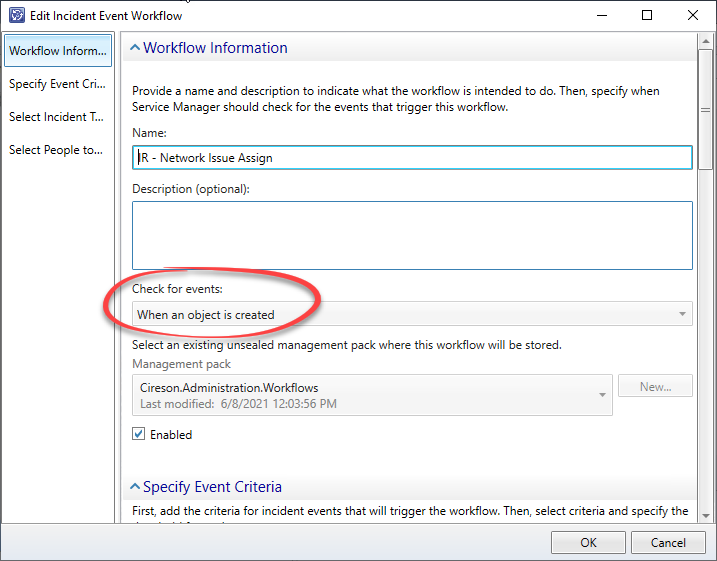
Workflow set to run on creation 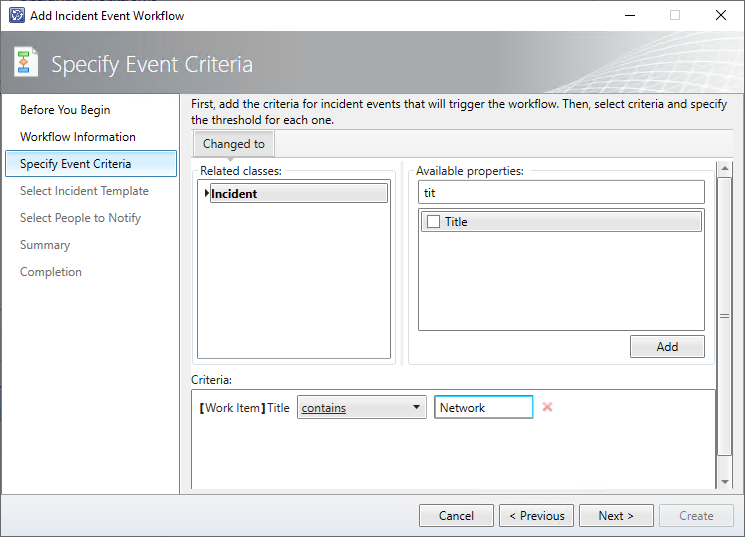
Only run if the word Network is in the title 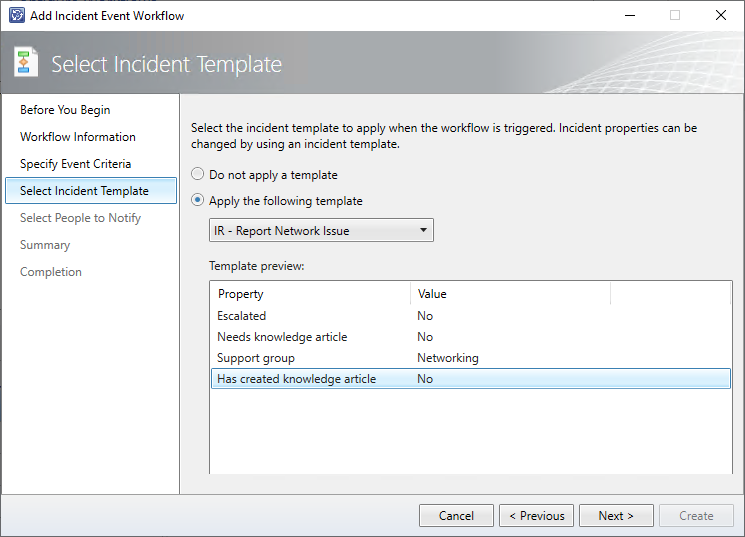
Apply a template to set the Support Group
Now this will work for the majority of the time but when it comes to migration, this workflow will run on all existing IR’s, even those that are closed, because there is no criteria stopping that from running. The correct way to have a workflow like this would to also check for the status and the support group before applying the template.
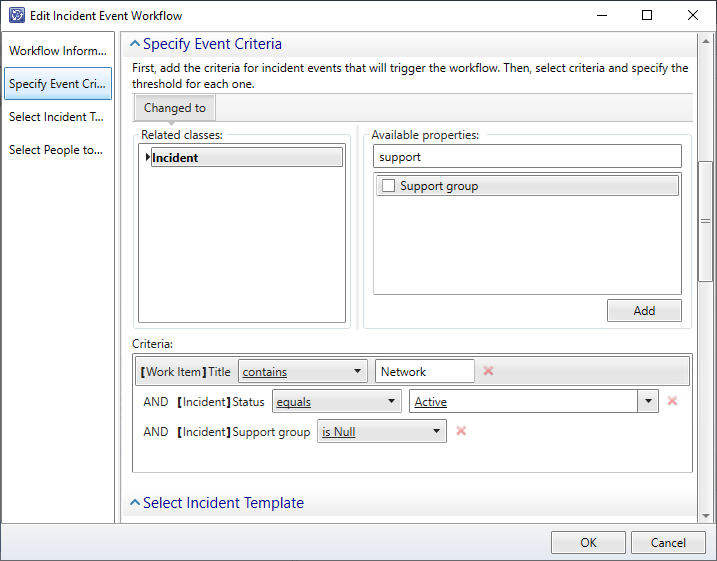
Setting a more specific set of criteria will reduce the number of incorrect triggers of this workflow and will greatly reduce, but potentially not eliminate, the number of migrated work items that will be impacted when this workflow runs. Technically there could be some IR in the source data that is Active, has the word Network in the title and has been unassigned from a support group, but these are diminishing numbers.
Many customers have custom workflows that will not show up in the Administration > Workflows > Configuration area of the console because any custom authored workflows do not show up in this menu. Custom authored workflows are often used when criteria for the workflow is not supported by the out-of-box wizard. Such as a workflow to run when a user comment has been added to the Work Item.
So how do we know the data source and destination match?
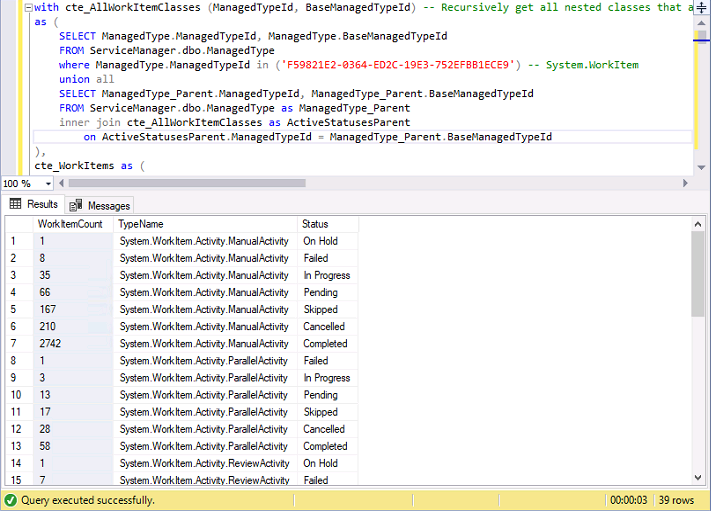
With help from a colleague and good friend, the following SQL query was created to report a count of not only all the work item types but also their statuses. This way we can determine if a workflow is running and changing the status of a work item and therefore throwing our data integrity out the window.
The query grabs each work item type and counts each of the work items and then groups them together based on their status. To ensure that it is human readable it then joins the DisplayString tables to turn Enumeration GUIDs in to actual values.
Once run against both Source and Destination servers the results can be exported to Excel and compared.
with cte_AllWorkItemClasses (ManagedTypeId, BaseManagedTypeId) -- Recursively get all Work Item classes.
as (
	SELECT ManagedType.ManagedTypeId, ManagedType.BaseManagedTypeId
	FROM ServiceManager.dbo.ManagedType
	where ManagedType.ManagedTypeId in ('F59821E2-0364-ED2C-19E3-752EFBB1ECE9') -- System.WorkItem
	union all
	SELECT ManagedType_Parent.ManagedTypeId, ManagedType_Parent.BaseManagedTypeId
	FROM ServiceManager.dbo.ManagedType as ManagedType_Parent
	inner join cte_AllWorkItemClasses as ActiveStatusesParent
		on ActiveStatusesParent.ManagedTypeId = ManagedType_Parent.BaseManagedTypeId
),
cte_WorkItems as (
	select
		cte_AllWorkItemClasses.ManagedTypeId
		,ManagedType.TypeName
		,BaseManagedEntityId_WorkItems.DisplayName
		,BaseManagedEntityId_WorkItems.BaseManagedTypeId
		,COALESCE(DisplayString_SRStatus.DisplayName, DisplayString_IRStatus.DisplayName, DisplayString_PRStatus.DisplayName, DisplayString_CRStatus.DisplayName, DisplayString_RRStatus.DisplayName,
					DisplayString_MAStatus.DisplayName, DisplayString_RAStatus.DisplayName, DisplayString_PAStatus.DisplayName, DisplayString_SAStatus.DisplayName, DisplayString_RBAStatus.DisplayName, DisplayString_DAStatus.DisplayName) as Status
	from cte_AllWorkItemClasses
	inner join ServiceManager.dbo.ManagedType
		on ManagedType.ManagedTypeId = cte_AllWorkItemClasses.ManagedTypeId
		and ManagedType.IsAbstract = 0
		and IsSealed = 1
		and IsExtensionType = 0
	inner join ServiceManager.dbo.BaseManagedEntity as BaseManagedEntityId_WorkItems
	on BaseManagedEntityId_WorkItems.BaseManagedTypeId = cte_AllWorkItemClasses.ManagedTypeId

	left join ServiceManager.dbo.MT_System$WorkItem$ServiceRequest as ServiceRequest
		on ServiceRequest.BaseManagedEntityId = BaseManagedEntityId_WorkItems.BaseManagedEntityId

	left join ServiceManager.dbo.DisplayStringView as DisplayString_SRStatus on DisplayString_SRStatus.LTStringId = ServiceRequest.Status_6DBB4A46_48F2_4D89_CBF6_215182E99E0F
		and DisplayString_SRStatus.LanguageCode = 'ENU'

	left join ServiceManager.dbo.MT_System$WorkItem$Incident as Incident
		on Incident.BaseManagedEntityId = BaseManagedEntityId_WorkItems.BaseManagedEntityId

	left join ServiceManager.dbo.DisplayStringView as DisplayString_IRStatus on DisplayString_IRStatus.LTStringId = Incident.Status_785407A9_729D_3A74_A383_575DB0CD50ED
		and DisplayString_IRStatus.LanguageCode = 'ENU'

	left join ServiceManager.dbo.MT_System$WorkItem$Problem as Problem
		on Problem.BaseManagedEntityId = BaseManagedEntityId_WorkItems.BaseManagedEntityId

	left join ServiceManager.dbo.DisplayStringView as DisplayString_PRStatus on DisplayString_PRStatus.LTStringId = Problem.Status_3C8876F4_FCBF_148C_FBAF_4CF4F02C6187
		and DisplayString_PRStatus.LanguageCode = 'ENU'

	left join ServiceManager.dbo.MT_System$WorkItem$ChangeRequest as ChangeRequest
		on ChangeRequest.BaseManagedEntityId = BaseManagedEntityId_WorkItems.BaseManagedEntityId

	left join ServiceManager.dbo.DisplayStringView as DisplayString_CRStatus on DisplayString_CRStatus.LTStringId = ChangeRequest.Status_72C1BC70_443C_C96F_A624_A94F1C857138
		and DisplayString_CRStatus.LanguageCode = 'ENU'

	left join ServiceManager.dbo.MT_System$WorkItem$ReleaseRecord as ReleaseRecord
		on ReleaseRecord.BaseManagedEntityId = BaseManagedEntityId_WorkItems.BaseManagedEntityId

	left join ServiceManager.dbo.DisplayStringView as DisplayString_RRStatus on DisplayString_RRStatus.LTStringId = ReleaseRecord.Status_F7BFD782_80B2_10C2_04B3_7F4C042DB5D2
		and DisplayString_RRStatus.LanguageCode = 'ENU'

	left join ServiceManager.dbo.MT_System$WorkItem$Activity$ManualActivity as ManualActivity
		on ManualActivity.BaseManagedEntityId = BaseManagedEntityId_WorkItems.BaseManagedEntityId

	left join ServiceManager.dbo.DisplayStringView as DisplayString_MAStatus on DisplayString_MAStatus.LTStringId = ManualActivity.Status_8895EC8D_2CBF_0D9D_E8EC_524DEFA00014
		and DisplayString_MAStatus.LanguageCode = 'ENU'

	left join ServiceManager.dbo.MT_System$WorkItem$Activity$ReviewActivity as ReviewActivity
		on ReviewActivity.BaseManagedEntityId = BaseManagedEntityId_WorkItems.BaseManagedEntityId

	left join ServiceManager.dbo.DisplayStringView as DisplayString_RAStatus on DisplayString_RAStatus.LTStringId = ReviewActivity.Status_8895EC8D_2CBF_0D9D_E8EC_524DEFA00014
		and DisplayString_RAStatus.LanguageCode = 'ENU'

	left join ServiceManager.dbo.MT_System$WorkItem$Activity$ParallelActivity as ParallelActivity
		on ParallelActivity.BaseManagedEntityId = BaseManagedEntityId_WorkItems.BaseManagedEntityId

	left join ServiceManager.dbo.DisplayStringView as DisplayString_PAStatus on DisplayString_PAStatus.LTStringId = ParallelActivity.Status_8895EC8D_2CBF_0D9D_E8EC_524DEFA00014
		and DisplayString_PAStatus.LanguageCode = 'ENU'

	left join ServiceManager.dbo.MT_System$WorkItem$Activity$SequentialActivity as SequentialActivity
		on SequentialActivity.BaseManagedEntityId = BaseManagedEntityId_WorkItems.BaseManagedEntityId

	left join ServiceManager.dbo.DisplayStringView as DisplayString_SAStatus on DisplayString_SAStatus.LTStringId = SequentialActivity.Status_8895EC8D_2CBF_0D9D_E8EC_524DEFA00014
		and DisplayString_SAStatus.LanguageCode = 'ENU'

	left join ServiceManager.dbo.MT_System$WorkItem$Activity$DependentActivity as DependentActivity
		on DependentActivity.BaseManagedEntityId = BaseManagedEntityId_WorkItems.BaseManagedEntityId

	left join ServiceManager.dbo.DisplayStringView as DisplayString_DAStatus on DisplayString_DAStatus.LTStringId = DependentActivity.Status_8895EC8D_2CBF_0D9D_E8EC_524DEFA00014
		and DisplayString_DAStatus.LanguageCode = 'ENU'

	left join ServiceManager.dbo.MT_Microsoft$SystemCenter$Orchestrator$RunbookAutomationActivity as RunbookActivity
		on RunbookActivity.BaseManagedEntityId = BaseManagedEntityId_WorkItems.BaseManagedEntityId

	left join ServiceManager.dbo.DisplayStringView as DisplayString_RBAStatus on DisplayString_RBAStatus.LTStringId = RunbookActivity.Status_8895EC8D_2CBF_0D9D_E8EC_524DEFA00014
		and DisplayString_RBAStatus.LanguageCode = 'ENU'

)

select
	COUNT(cte_WorkItems.BaseManagedTypeId) as WorkItemCount
	,cte_WorkItems.TypeName
	,cte_WorkItems.Status
	--,cte_WorkItems.DisplayName
from cte_WorkItems
group by TypeName, status
order by TypeName, WorkItemCount
Here is a screen shot of some results that show the count, the status and the class:
A quick match up in Excel can then make any discrepancies jump out for you to act on.
Hope this helps in your next migration project.