
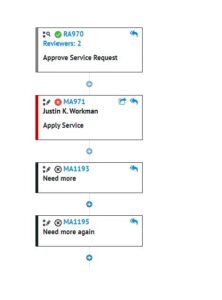
As customers start to mature their ITSM solution within SCSM process control and self-service the use of activities increases as they introduce review, manual, and automation activities to formalise their business processes. However, as processes become more complex and more review activities are used, if a review activity is rejected and the status of the underlying request is then set to failed, any remaining activities are never started and therefore remain in pending status forever. This can mess with reporting by showing a false number of outstanding activities within the environment.
Traditionally this has been a manual clean-up of the activities after the fact that can either be forgotten about or ignored until such time as someone complains about the inaccuracy of the reports they are generating.
What would be good is to have a work flow that runs when a Service Request or Change Request changes its status to failed or rejected and have it detect any outstanding activities that are associated with the work item then incrementally go through them and set their status to Cancelled.
The workflow that I have created does this clean-up for us. When a SR or CR changes its status to Failed (SR) or Rejected (CR) then the workflow will run and detect any activities with a status of Pending that are related to the work item. It will then proceed to set the status of these activities to Cancelled.

If you are thinking of implementing this in to your environment you have to note that the workflow only runs when a SR or CR work item changes status and therefore will NOT affect any existing activities that will exist within the system that relate to already closed work items. Instead, these would have to be cleaned up manually or via PowerShell script.
You can download this solution from my GitHub repository: